Arch - AI Home Design
- 4.3
- Rating
- 1.00M
- Installs
- Free
- Price

 Analysis by App-foxy
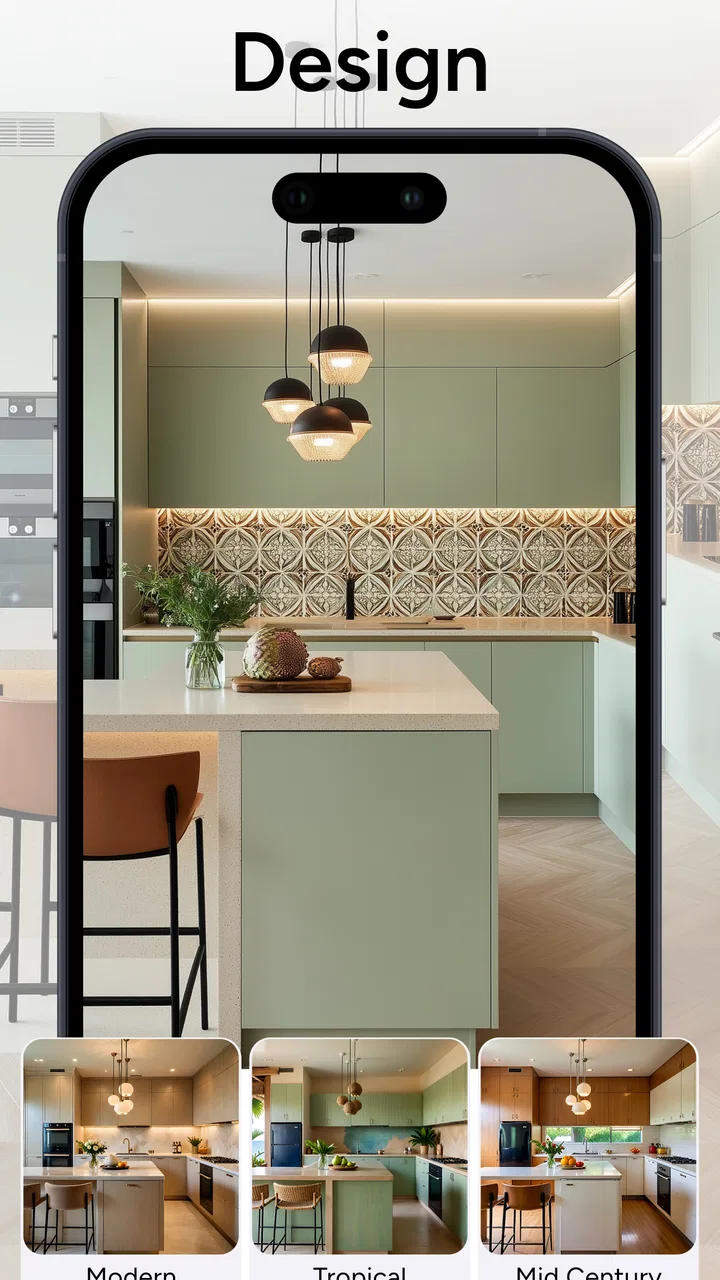
I approached Arch - AI Home Design as a practical room-planning tool rather than a replacement for an architect or a full interior-design program. After using it to rethink ordinary living spaces, I found its biggest appeal quickly: it can turn a room photo or a rough visual idea into a more polished design direction without asking me to learn complicated drawing software. That makes it especially approachable for anyone who wants to explore furniture styles, colors, and layouts before spending money.
This is an Art & Design app from APPNATION AS, available for free with optional in-app purchases ranging from $4.99 to $89.99 per item. It is rated for Everyone, requires Android 8.0 or later, and has reached over a million installs. The current release is version 2.20.6, while its average score sits at 4.3 from roughly 36 thousand ratings. Those figures suggest a well-established audience, but they do not remove the need to understand what the app is actually good at: visual experimentation, not precise construction documentation.
My baseline workflow for turning a room idea into something usable
I get the most from Arch when I begin with a specific question. Instead of opening it with the vague goal of “making the room nicer,” I decide what I want to test: a warmer color scheme, a more minimal style, a different arrangement, or a way to make a small room feel less crowded. This small change in approach prevents the app from becoming a gallery of attractive but impractical images.
You May Also Like

 Blood Strike: 2.5 Anniversary
Blood Strike’s Loadouts Turn Every Drop Into a Tactical Gamble
A close look at Blood Strike’s custom loadouts: how fast access to signature weapons reshapes its battle royale rhythm, rewards preparation, and narrows the gap between fights.

 Pandora - Music & Podcasts
Pandora’s Music Is Easy to Start, but Harder to Recover
Pandora’s strength is its low-effort path from a seed to a station. Its weak spot is how much confidence it asks you to place in connection, setup, and quiet recovery.

 8 Ball Pool
 Is Built on Rivalries, Rematches, and Routine
A close look at the rivalries, rematches, shared routines, and unanswered safety questions that turn a quick pool match into a persistent mobile community.

 Samsung Music
’s Quiet Strength Is Playing What You Already Own
Its reach comes less from spectacle than from dependable access to a personal library. That simplicity is both the app’s strongest retention engine and its ceiling.

 AccuWeather: Weather Radar
AccuWeather Review: A Quick, Clear Forecast for Everyday Decisions
For everyday plans, the best forecast is the one you can understand quickly. AccuWeather makes rain timing, radar, and local conditions easy to act on, with a few trade-offs.

 Hill Climb Racing
Why Hill Climb Racing Still Turns Crashes Into One More Run
A tiny car, a bumpy hill and one more upgrade: Hill Climb Racing keeps resurfacing because its simple chaos makes every near-miss feel personal.
More From Our News Desk



My usual starting point is a clear photo of the room. I try to take it in good light, keep the camera as level as possible, and include the main walls and floor. A cluttered image can still be useful, but the generated result is easier to judge when the app can distinguish the room from loose objects. I also keep expectations realistic: an AI redesign can suggest a mood and a direction, but it may reinterpret proportions, windows, doors, or existing furniture.
Once the image is prepared, I compare several design directions rather than treating the first result as the answer. One version might emphasize lighter materials, another might be more contemporary, and a third might preserve more of the existing room. The value is in the comparison. I can notice which elements consistently improve the space and which ones only look appealing in isolation.
For a realistic everyday example, imagine that I am preparing a spare bedroom as a home office. I could use the app to test whether a calm neutral palette feels better than a darker, more dramatic one, or whether a simple arrangement looks less cramped than a heavily decorated version. I would not order furniture directly from the image. Instead, I would use it to narrow the design brief before measuring the room and checking real products.
That distinction matters because AI-generated interiors often make a room appear more finished than it would be in daily use. A beautiful image may show a desk without considering cable management, a chair without leaving enough clearance, or decorative objects that would quickly become clutter. I treat every output as a visual proposal, then bring practical questions back into the process myself.
What I check before trusting a generated design
I look first at the parts of the image that should remain stable. Are the windows still in sensible positions? Does the floor meet the walls naturally? Has a doorway become a decorative panel? Are large pieces of furniture facing the right direction? If the answer is no, I keep the image for inspiration but do not use it as a layout reference.
I also compare the result with the room’s real light. AI images can make a dark corner appear bright or give a cool room a warm glow. That can be useful for imagining possibilities, but it can also lead me toward colors that will feel very different in the morning or at night. I find it helpful to use the app for broad color relationships and then test paint samples or fabric swatches in the actual space.
Another useful habit is separating permanent decisions from reversible ones. Wall color, flooring, and built-in storage deserve more caution than cushions, lamps, or artwork. If Arch suggests a strong style, I first recreate the feeling with inexpensive or movable items. This lets me test whether I genuinely enjoy the look before committing to a costly change.
Settings and choices worth checking before you generate
The most important “setting” is often the input rather than a hidden control. I make the room type and the desired style as clear as possible, because a vague request produces a result that may be attractive but difficult to act on. A focused brief such as “small reading corner with warm wood and limited decoration” is more useful to me than simply asking for a beautiful room.
I also decide whether I want the app to preserve the room’s identity or explore a complete transformation. For a rental apartment, I would lean toward changes that can be undone: textiles, lighting, movable storage, and decorative accents. For a future renovation, I might allow a more radical visual direction, while remembering that the result still needs to be checked against measurements and building constraints.
When comparing designs, I try to change one major idea at a time. If I alter the color, furniture style, lighting mood, and amount of decoration in every attempt, I cannot tell which change improved the result. Keeping the experiments controlled makes the app more useful as a decision tool rather than a random inspiration machine.
It is also worth reviewing the purchase prompts carefully. The app is free to install, but optional purchases are part of the experience. I prefer to explore the basic workflow first and decide whether the extra options genuinely help with my project. This is particularly important for casual users who only want one room concept; a paid upgrade may be less valuable to them than it is to someone repeatedly planning several spaces.
The age rating of Everyone makes the app broadly approachable, and the Android requirement of version 8.0 or newer keeps it available to many devices. Even so, the quality of the experience can depend on the phone’s camera, screen, and general performance. A design viewed on a small or low-quality display may not reveal awkward details that become obvious later, so I prefer to inspect important results on a larger screen when possible.
Repeatable patterns that make the app faster to use
My fastest workflow follows a repeatable loop: capture, define the goal, generate a few directions, reject unrealistic results, and save the strongest visual reference. The key is not producing endless variations. It is making each attempt answer a slightly different question.
For example, I might begin with the existing room and ask what a lighter approach would look like. Then I compare that with a version that keeps the same general mood but reduces decoration. After that, I may focus on one feature, such as the wall treatment or seating area. This sequence gives me a clearer understanding of the room than generating unrelated styles one after another.
I find it useful to keep a short note beside the images. I record what I liked, what looked impractical, and what I would need to verify in person. This prevents the common mistake of remembering only the attractive overall impression. A design may have a good color palette but an unusable furniture arrangement; written notes make that trade-off visible.
Another efficient pattern is using Arch before shopping, not after. If I am considering a new sofa, rug, or storage unit, I first use the app to identify the kind of proportion and texture that suits the room. Then I search for real products that resemble the visual direction. This is more effective than buying an item because it looks good in a generated scene and discovering that it overwhelms the actual space.
The app is also helpful when communicating with another person. If two people disagree about whether a room should be cozy, modern, colorful, or restrained, a visual concept can make the conversation more concrete. I still would not treat the image as an objective answer, but it can move the discussion away from vague descriptions and toward specific choices.
For renters, I would use the tool as a way to test atmosphere without planning permanent alterations. Try a few combinations of textiles, lamps, artwork, and movable furniture, then check whether the style works with the landlord’s restrictions. For homeowners, the same process can help prioritize a renovation: perhaps the visual evidence shows that lighting and storage matter more than replacing every piece of furniture.
Where the AI approach reaches its limits
The central limitation is precision. Arch can help me imagine a room, but I would not rely on it for exact dimensions, structural decisions, electrical planning, accessibility clearances, or a contractor’s build instructions. A generated image can make a narrow walkway appear generous, and it may place objects in ways that ignore doors, radiators, outlets, or the direction in which cabinets open.
This is where a traditional room planner is sometimes the better choice. A measurement-based planner is preferable when I need to confirm that a bed, desk, or sofa physically fits. A professional design program is stronger for detailed floor plans, materials, lighting plans, and revisions that must remain consistent. Arch is more immediate and visually friendly, but that convenience comes from simplifying the problem.
It also has a weakness that affects style decisions: visual coherence is not the same as personal suitability. A polished image may follow familiar design patterns, yet the room may not match my habits. Someone who works from home, owns large equipment, shares a room with children, or needs accessible circulation should judge the result against daily routines rather than visual appeal.
I am cautious with highly decorated outputs as well. They can encourage overfilling a room because the image looks richer with more objects. In practice, every extra item needs cleaning, storage, maintenance, and space. I often remove half of the decorative suggestions mentally and ask whether the room still works. If it does, the remaining elements are more likely to be meaningful.
The purchase model is another consideration. Free access is useful for trying the concept, but users who want to explore repeatedly should pay attention to which capabilities are available without spending and whether an upgrade fits their needs. I would not recommend purchasing anything until I had a clear project and had confirmed that the added access improves that project rather than simply encouraging more generations.
People who want exact shopping lists, guaranteed product availability, professional measurements, or technically accurate renovation plans should skip Arch as their main tool. It may still be useful for the early inspiration stage, but another app, a spreadsheet, a measurement tool, or a designer will serve the later stages better.
Who will enjoy it most, and who should choose another route
I think Arch is a strong fit for visually minded users who struggle to imagine how a room could change. It is also useful for first-time decorators, renters planning reversible improvements, homeowners comparing broad styles, and anyone preparing a conversation with a partner or designer. The low barrier to entry is its strongest practical advantage.
It is less suitable for users who already know exactly what they want and need technical control. If I have measured a room carefully and need a furniture plan that respects every dimension, I would choose a dedicated planner first. If I am selecting finishes for a major renovation, I would use Arch only as a mood-board companion, not as the source of final specifications.
Compared with browsing ordinary interior-design photos, the app feels more personal because it can help me think about a particular room rather than a generic showroom. Compared with a detailed design suite, it is quicker and less intimidating, but also less dependable for accuracy. Its position between those alternatives is what makes it worthwhile: it gives me a fast visual starting point without pretending to replace the entire design process.
My verdict after building a repeatable design habit
My best results came when I stopped asking Arch to solve interior design completely. Used as a rapid concept generator, it helped me identify colors, moods, and furniture directions that I could then test against measurements, budget, light, and everyday habits. Used as a final authority, it would create false confidence.
I especially recommend a disciplined approach: photograph the room clearly, define one design question, compare a small number of focused variations, and inspect every result for practical errors. Keep the strongest image as a reference, not a promise. Then verify the real space before buying anything or making permanent changes.
APPNATION AS has made an accessible art-and-design experience for people who want to see possibilities quickly. The free entry point and Everyone rating make it easy to try, while the optional purchases mean frequent users should decide carefully how much they want to invest. Its broad audience and 4.3 average show that the concept connects with many users, but the right expectations matter more than the score.
My recommendation is simple: use Arch to make the first design decision easier, then use real measurements and real life to make the final decision. If you want inspiration for a bedroom, living room, office corner, or rental refresh, it is an enjoyable and practical place to begin. If you need construction accuracy or a fully documented floor plan, pair it with a dedicated planning tool instead of asking it to do a job it was not built to handle.
FAQs for Arch - AI Home Design
01What is Arch - AI Home Design and what can I use it for?
Arch - AI Home Design is an AI-powered interior and home visualization app that helps you explore decorating ideas from photos of your rooms. After uploading or taking an image, you can experiment with different interior styles, furniture arrangements, colors, and finishes. It is mainly useful for inspiration, early planning, and comparing concepts before making design or renovation decisions.
02How does the AI room redesign feature work?
The app generally works by analyzing a photo of an existing room and generating a redesigned version based on a selected style or written description. Results can vary depending on lighting, image quality, room layout, and how clearly the requested changes are described. The generated image is best treated as a visual concept rather than an exact architectural plan or guaranteed representation of real products.
03Is Arch - AI Home Design free to download and use?
Availability of features may depend on the current version, platform, region, and subscription model. The app may offer free tools, limited generations, trial access, or previews while reserving higher-quality results and additional design options for paid plans. Before starting a trial or confirming a purchase, review the in-app pricing, renewal terms, and cancellation instructions shown in the App Store or Google Play.
04Can I use the designs to plan a real renovation or purchase furniture?
You can use the generated designs as inspiration when discussing ideas with an interior designer, contractor, or furniture retailer. However, AI images may alter dimensions, windows, doors, lighting, materials, or furniture proportions, so they should not replace accurate measurements, technical drawings, building regulations, or professional advice. Always verify product availability, measurements, colors, and installation requirements separately.
05What privacy considerations should I know about before uploading room photos?
Before uploading images, check the app’s current privacy policy and the permissions requested on your device. Room photos can reveal personal belongings, addresses, layouts, or other identifying details, and images may be processed on remote servers to generate results. Avoid including people, documents, valuables, or sensitive information, and confirm how uploaded content is stored, used, and deleted.
Pros
- Generates multiple room redesign concepts quickly.
- Useful for testing different interior styles before renovating.
- Can provide inspiration from a single room photo.
- Helps visualize furniture and color combinations.
- Simple interface makes experimentation accessible to beginners.
Cons
- Results may include unrealistic layouts or impractical furniture placement.
- Some advanced designs may require a subscription or paid credits.
- Image quality and accuracy can vary between rooms and photos.
- AI suggestions may overlook measurements
- lighting
- or structural limits.
- Uploading interior photos may raise privacy concerns for some users.

Arch - AI Home Design
Gallery